













i’ve been trying to cut down on some work subscriptions, even though i’m always trying out new ones every month. i’m not really a subscription hater. i love how many cool new tools and programs there are to try, all the time. i remember when programs only came out once a year and you had to install them via disc — maybe they felt more purposeful that way. but, i digress.
i’ve tried clip studio paint so many times and never really gotten the hang of it. i know it’s powerful. but all of the tools feel overwhelming to me. maybe it’s just that i grew up with photoshop.
the two main things i’m missing from csp are the intermediate color palette and the 3d posing tools. to be honest i found the 3d posing kind of clunky, and i can do a better job of it in blender if i’m doing a drawover, but i do miss the convenience of having it in app. recently i was fighting with a swatch i had created, trying to get a few good colors together for a sketch, and i realized i could put my own intermediate color palette together to reduce some of that friction.
i would actually highly recommend soul stirring digital color mastery and pixel math from BlenderNPR if you’re interested in this kind of thing. but knowing how things work and being able to do things in practice without it screwing up your flow just to make a sketch are two different stories.
if you’re not familiar with the intermediate color picker, mine works like this:
it’s a panel. four corners — top-left, top-right, bottom-left, bottom-right. click a corner to drop your current foreground color into it. the grid fills with the blends. click any grid square to make it your foreground.
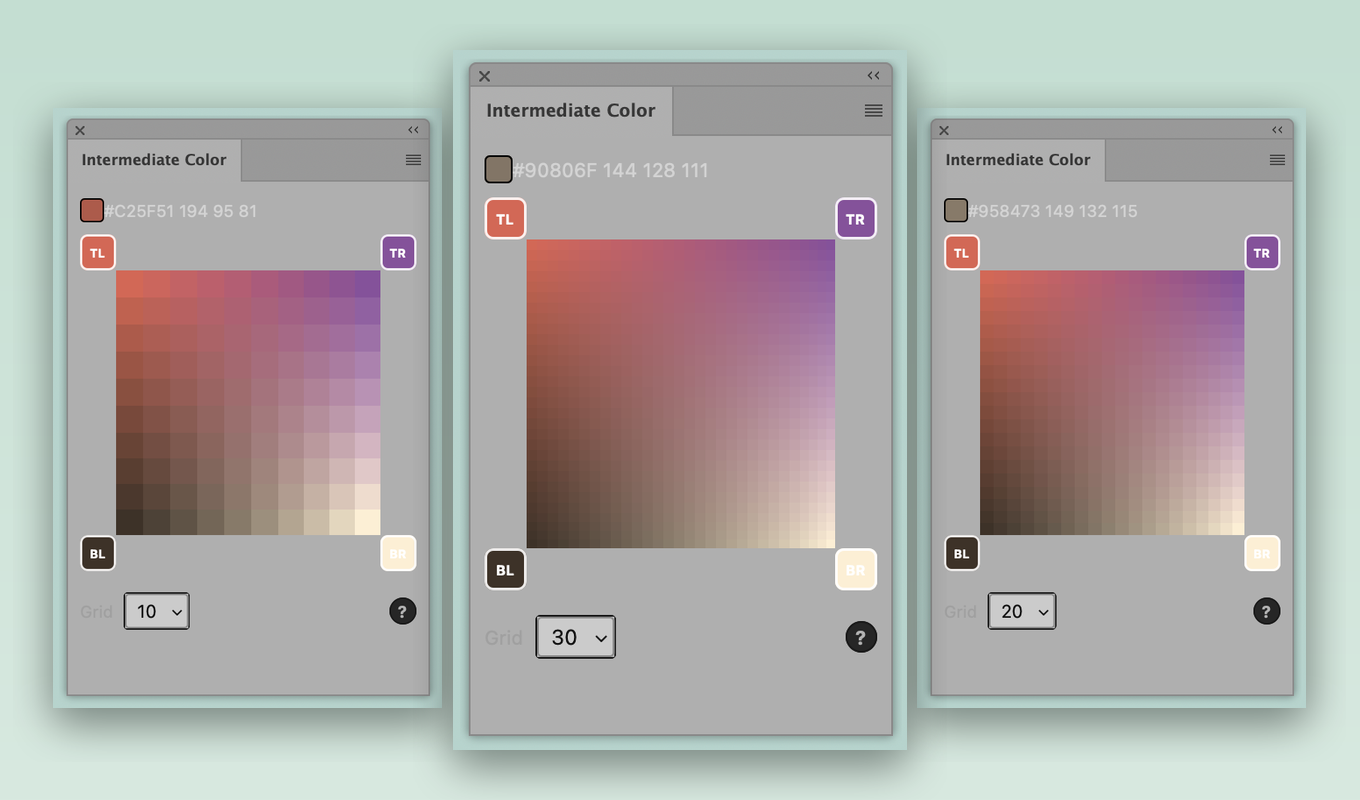
the one detail i actually cared about is that the blends are mixed in CIELAB, not RGB. RGB blending goes muddy in the middle. if you mix a bright red and a bright blue and you land on a dead grey-purple. LAB keeps the in-between steps looking magically intentional (well, it’s color magic!).
you can switch between 10, 20, and 30 divisions. i actually prefer 10, but sometimes i work in a hyper rendered style and 30 is great. especially if you pick from it with your eyes closed. the corner colors save between sessions, so it remembers your palette. if your photoshop is set to spanish, the panel is too. it works on mac and windows. it’s free.
install
update: adobe published it. easiest install now is straight from the marketplace: intermediate color picker & harmonies. one click, no unsigned-plugin warning.
or, if you’d rather sideload the .ccx directly:
- download intermediate-color.ccx.
- double-click it. creative cloud opens and installs the plugin.
- you’ll get a warning that it isn’t from the adobe marketplace. that’s expected since i’m handing it out here directly. click install.
- if it asks for permission, allow it. the plugin saves your corner colors to a small local file; that’s all it needs access for.
- open photoshop. the panel lives under plugins → intermediate color. drag it wherever you want it.
requires photoshop 2022 (version 23.3) or newer. mac and windows.
to remove it later: creative cloud desktop app → manage plugins.